Access
The National Theatre aims to be welcoming and accessible to all.

Through a programme of assisted performances, accessibility devices and adjustments at our South Bank home, we hope to meet the requirements of deaf, disabled and neurodivergent people, as well as those who have requirements due to physical or mental health conditions.
Contact us
Get in touch if you would like to find out more about what we offer or have any specific questions about Access at the National Theatre.
You can also call us if you would prefer to apply to the Access Scheme over the phone.
Call 020 7452 3961
Join our Access scheme
Deaf, disabled and neurodivergent visitors are invited to join our Access scheme in order to ensure that we can better meet their requirements
Individuals who are signed up to the Access scheme will be able to:
- Book tickets for accessible seats online including wheelchair user spaces
- Receive information on any upcoming access performance
- Have early booking for access tickets
- Receive adjusted seat prices for themselves and a companion


Visiting us on the South Bank
You can find information about transport routes, parking spaces for Blue Badge holders, and our car park on our Getting here page
We also have details about our Olivier, Lyttelton and Dorfman Theatres (including wheelchair-user spaces) to help you plan your visit.
Find the right assisted performance for you
We have a range of assisted performances available at the South Bank, as well as additional support for all of our shows.
Audio described
During these performances, the actors dialogue is incorporated with live commentary that explains what is happening on stage via a headset. In addition, we also provide Touch Tours and audio notes beforehand.
British Sign Language interpreted
For these performances we hold tickets with the best view of the interpreter for members of our Access Scheme. Members must log in to be available to select these tickets.
Captioned
These performances have text on screens so that Deaf and hard of hearing, or anyone that would like to read along, can also enjoy the performance.
Chilled
These performances allow for noise and movement in the auditorium, as well as re-entry for anyone who may need time away from the performance.
Sensory-adapted/ Relaxed performances
Technical changes (such as adjustments to light and sound effects) are made for those with sensory sensitivities. These performances also allow for noise and movement in the auditorium, a chill-out space for anyone who may need time away from the performance, and re-entry when needed.
Dementia-friendly performances
Tailored to suit the needs of people living with dementia, these performances have a relaxed environment in the auditorium. Adjustments are also made to the production to make a welcoming experience.
A visual story is also sent ahead of time to help prepare for the performance.
Support available for your visit
Along with our Access performances, we also have a range of support in place to help you attend any of our shows.
Hearing enhancement headsets
All three theatres use an infra-red hearing enhancement system. You can collect the William AV headsets to access the system on arrival outside each of our theatres.
Hearing loop system
Both the Olivier and the Lyttelton theatres have hearing loops. Due to the changing layout of the Dorfman Theatre there is no installed loop, but you can request a personal neck-loop from the Dorfman cloakroom.
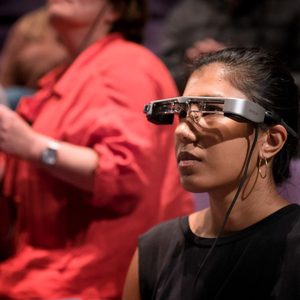
Smart caption glasses
These glasses are a way for people to view captions during some of our shows. They display a transcript of the dialogue and a description of the sounds on stage on the lenses. The smart caption glasses technology is not compatible with all shows, such as those with improvisation, captioned performances, or a running time of longer than three hours. The Access section on each show page details whether glasses are available for a show and if so, which performances they will be available from. Watch our video to find out more.
Assistance animals
We welcome assistance animals.
We can offer you an aisle seat, and let you know about any special effects that might affect your dog. Alternatively, you can leave your assistance animal with our front-of-house staff.
National Theatre shows near you
We have a wide range of shows online with captions, BSL and audio description on National Theatre at Home. You can also find our National Theatre Live programme in cinemas around the world.


Supporters
Access at the National Theatre is supported by The Band Trust and The Lewis Family Charitable Trust.